Author: Dr Val Phua
Estimated reading time: 9–10 minutes
Spending Hours in Front of a Screen? Your Eyes May Be Feeling the Strain.
Whether you’re working on a computer, attending online meetings, studying, gaming or scrolling through your smartphone, prolonged screen use has become part of everyday life.
Many people notice tired eyes, blurred vision or headaches after long hours of digital device use. These symptoms are commonly grouped under the term Computer Vision Syndrome (CVS), also known as Digital Eye Strain (DES).
The good news is that computer vision syndrome does not usually cause permanent damage to the eyes, but it can significantly affect comfort, productivity and quality of life.
Fortunately, most symptoms improve with simple changes to your work habits and environment.
What Is Computer Vision Syndrome?
Computer Vision Syndrome refers to a group of eye and vision problems caused by prolonged use of digital screens.
Unlike reading printed text, looking at digital screens places greater demand on the eyes because of:
- Constant focusing
- Screen glare
- Reduced blinking
- Poor posture
- Long periods of uninterrupted near work
Symptoms often become worse as screen time increases.
What Causes Computer Vision Syndrome?
Several factors contribute to digital eye strain.
Reduced Blinking
People normally blink about 15–20 times per minute.
When concentrating on a computer screen, blink rates may fall by up to 60%, allowing tears to evaporate more quickly.
This is one of the main reasons screen users develop dry, irritated eyes.
Prolonged Focusing
Looking at a near object for many hours requires continuous contraction of the eye’s focusing muscles.
Over time this can lead to:
- Eye fatigue
- Difficulty refocusing into the distance
- Temporary blurred vision
Dry Eye Disease
Many people with computer vision syndrome also have underlying dry eye disease.
The reduced blink rate associated with screen use often makes dry eye symptoms significantly worse.
Poor Ergonomics
Incorrect monitor height, poor lighting and excessive glare increase visual effort.
Uncorrected Spectacle Prescription
Even a small refractive error may become noticeable after prolonged computer use.
Common Symptoms
Computer vision syndrome may cause:
- Tired eyes
- Dry eyes
- Burning or stinging
- Blurred vision
- Temporary difficulty focusing
- Headaches
- Neck pain
- Shoulder pain
- Increased sensitivity to light
Symptoms often improve after resting the eyes.
Who Is Most at Risk?
Computer vision syndrome is more common in:
- Office workers
- Students
- Gamers
- Graphic designers
- Programmers
- Frequent smartphone users
- Contact lens wearers
- People with dry eye disease
Anyone spending more than two consecutive hours on digital devices may experience symptoms.
Does Blue Light Cause Computer Vision Syndrome?
Not directly.
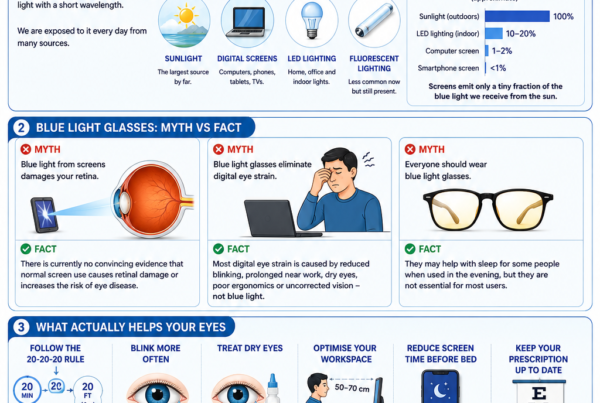
Many people believe blue light is the primary cause of digital eye strain.
However, current scientific evidence suggests that symptoms are mainly due to:
- Reduced blinking
- Dry eyes
- Continuous near focusing
- Poor ergonomics
- Inadequate breaks
Blue light filtering glasses have not consistently been shown to reduce digital eye strain in clinical studies.
Reducing blue light exposure in the evening may improve sleep, but it is unlikely to be the main solution for daytime screen fatigue.
How Can You Prevent Computer Vision Syndrome?
Follow the 20-20-20 Rule
Every 20 minutes:
- Look at something at least 20 feet (6 metres) away.
- Continue looking for 20 seconds.
This allows the focusing muscles to relax.
Blink More Often
Consciously blinking helps maintain a healthy tear film and reduces dryness.
Optimise Your Workstation
- Position the monitor approximately 50–70 cm away.
- Place the top of the screen slightly below eye level.
- Reduce glare from windows.
- Adjust screen brightness to match the room.
Maintain Good Posture
Keep your:
- Back supported
- Feet flat on the floor
- Shoulders relaxed
- Wrists neutral
Good posture reduces neck and shoulder discomfort associated with prolonged computer use.
Treat Dry Eyes
Artificial tears, warm compresses and appropriate dry eye treatment may significantly improve symptoms.
Update Your Glasses
An outdated spectacle prescription can increase eye strain during prolonged computer work.
Should Children Be Concerned?
Yes.
Children are spending increasing amounts of time on digital devices for both education and recreation.
Although computer vision syndrome itself does not cause permanent eye damage, prolonged near work combined with reduced outdoor time has been associated with the development and progression of myopia (short-sightedness).
Encouraging regular outdoor activity remains one of the most effective ways to reduce childhood myopia progression.
When Should You See an Eye Specialist?
You should seek an eye examination if:
- Symptoms persist despite taking breaks.
- Your vision remains blurred.
- You experience significant eye pain.
- You have persistent redness.
- You notice double vision.
- You develop sudden vision loss.
An ophthalmologist can determine whether your symptoms are due to computer vision syndrome or another eye condition.
Frequently Asked Questions
Can computer screens permanently damage my eyes?
Current evidence suggests that normal screen use does not cause permanent damage to healthy eyes.
Are blue light glasses necessary?
Most people do not require blue light filtering glasses to reduce digital eye strain.
Good visual habits are usually more effective.
How often should I take breaks?
The 20-20-20 Rule is an easy and effective guideline.
Should I use artificial tears?
If your eyes feel dry or irritated, preservative-free lubricating eye drops may provide relief, particularly during prolonged computer use.
The Bottom Line
Computer Vision Syndrome is increasingly common in our digital world, but it is usually manageable with simple lifestyle changes.
Regular breaks, conscious blinking, good workstation ergonomics and treatment of dry eye disease remain the most effective ways to reduce symptoms.
If your symptoms persist or your vision changes, a comprehensive eye examination can help identify any underlying eye conditions and ensure your eyes remain healthy despite long hours of screen use.
References
- American Academy of Ophthalmology. Computer Vision Syndrome and Digital Eye Strain.
- American Optometric Association. Computer Vision Syndrome.
- National Eye Institute. Digital Eye Strain.
- Cochrane. Blue-light filtering spectacle lenses for visual performance, sleep and eye health.
- International Myopia Institute. Near Work, Screen Time and Myopia.